
diados
Extension of the Day

diados

5.0 FREE
  • Screenshot 1

Description

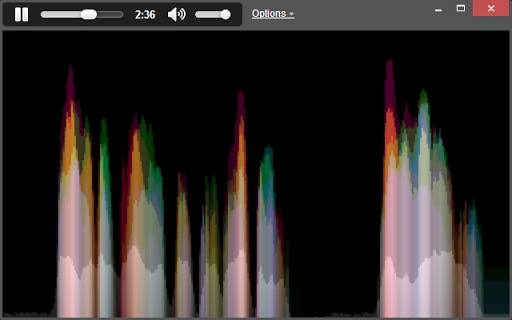
Visualizer of sound, using a custom algorithm (Aurora). Visualizes microphone input.Blog:http://aurorasound.tumblr.com/Aurora visualization algorithm is not only extremely pretty, it's also easier to "read" at a glance than a traditional spectrogram visualization.----------------New through v0.1.21:- Dropped support for MP3 visualization, due to underlying Chrome supportNew through v0.1.20:- Fixed deprectated Web API functionNew through v0.1.17:- Bigger viewer window - because bigger is better- Wider frequency range for Music & Ambient modes- Fixed noise filter for "Aurora" algorithm modeNew through v0.1.14:- Auto-start for Microphone input- Window resize behavior improvementsNew through v0.1.13:- Sample rates (scroll speeds) adjustable in settings- "Settings Presets" added on main window- "Frameless" Chrome appNew in v0.1.7:- Better options dropdown UX- 75% noise reduction by defaultNew in v0.1.6:- Algorithm tweaks, UX tweaksNew in v0.1.5:- Opening options doesn't force a window resize- Added noise reductionNew in v0.1.4:- Now, with improved spelling!New in v0.1.3:- Making viewer resize when window is resized.- Dark theme, more polished controls

Guides & Tutorials for Aurora Sound Viewer App for Chrome

How to install Aurora Sound Viewer App for Chrome
  1. Click the Preview / Download button above.
  2. Once redirected, accept the terms and click Install.
  3. Wait for the Aurora Sound Viewer App for Chrome download to finish on your device.
How to use Aurora Sound Viewer App for Chrome

This software is primarily used for its core features described above. Open the app after installation to explore its capabilities.

User Reviews for Aurora Sound Viewer App for Chrome 0

    No reviews found

Similar Apps


